Optimizing your inventory format in Excel for production
Use three linked Excel Tables: Raw Materials, BOM and Finished Goods. Give each material a unique identifier, keep stock and recipe quantities in the same unit, and calculate production capacity from the material that runs out first. Track completed goods separately from what you could make.
Updated
The short version
Separate the three rolesRaw materials record inputs, the BOM records recipe requirements, and finished goods record completed stock and potential output.
Keep quantities comparableConvert purchases to a consistent stock unit and normalize every BOM line to one finished unit.
Calculate the bottleneckDivide available stock by the requirement per unit for each material. The lowest result sets the material capacity.
Do not promise the same stock twiceDeduct outstanding material reservations before checking another order. Product capacities are not additive when recipes share ingredients.
Takeaway. A useful production spreadsheet connects stock, recipes and output. Its calculations are only as current as the receipts, reservations and production deductions you record.
Start with three linked Excel Tables
A flat inventory list answers how much you have. A production workbook must also answer what that stock can become. For a bakery, flour belongs in Raw Materials, the flour required by each loaf belongs in the BOM, and baked loaves ready to sell belong in Finished Goods.
Create three sheets and turn each data range into an Excel Table using Insert > Table. Name the tables Raw_Materials, BOM and Finished_Goods. Structured references adjust as table data changes, and calculated columns can fill formulas down. Separate tabs make the relationships easier to inspect, but they do not prevent errors by themselves.
The format below assumes a single-level BOM, positive recipe quantities, one row per product and material combination, and a consistent currency. A starter or other intermediate recipe needs its raw inputs expanded before you calculate capacity.
A practical manufacturing inventory workbook
Table
One row represents
Main purpose
Raw_Materials
One ingredient or component
Physical stock, reservations and cost
BOM
One material in one product
Quantity and material cost per finished unit
Finished_Goods
One finished product
Completed stock, material cost and capacity
Tab 1: raw materials and available stock
Record ingredients, jars, boxes and labels as separate materials. Use a stable Material_SKU as the lookup key, even if the item's display name changes. This workbook identifier does not mean you need a sales-channel SKU to use Makeable.
=[@Current_Stock]-[@Reserved_Stock]
Raw_Materials column layout
Column
Format
What to record
Material_SKU
Text
Unique key, such as RAW-FLOUR-01
Material_Name
Text
Ingredient or component name
Stock_Unit
Text
g, mL or individual units
Purchase_Unit
Text
Supplier unit, such as one 25 kg bag
Conversion_Factor
Number
Stock units in one purchase unit: 25,000 g per bag
Current_Stock
Number
Physical stock in Stock_Unit
Reserved_Stock
Number
Outstanding requirements of accepted orders
Available_Stock
Formula
Physical stock less outstanding reservations
Unit_Cost
Currency
Cost of one Stock_Unit, not one bag
Reorder_Point
Number
Your chosen minimum in Stock_Unit
A negative available balance signals existing commitments already exceed stock. Investigate it rather than hiding it. Reserved_Stock must exclude materials already consumed by completed production runs, or you will subtract them twice. See the material shortage calculation guide for reservation examples.
Tab 2: recipe and bill of materials
Each BOM row connects one finished product to one raw material. Write all quantities per finished unit, not a mixture of batches and individual items. A batch requiring 5,000 g of flour and yielding 10 loaves needs 500 g per loaf. Include packaging lines when you want material cost to include packaging.
Quantity_Per_Unit multiplied by one plus the allowance
Component_Cost
Formula
Effective_Quantity multiplied by material Unit_Cost
Units_Possible
Formula
Whole units supported by that material
These formulas require Excel with XLOOKUP support, such as Microsoft 365 or Excel 2021 and later. XLOOKUP is not available in Excel 2016 or 2019; use INDEX with MATCH there. A missing component should show a lookup error for you to correct, not silently turn into zero cost.
Do not repeat a component within the same product: combine its quantities first. Two flour lines checked independently would each see the same stock and could overstate capacity. Our bill of materials guide explains the recipe structure.
Tab 3: finished goods, cost and capacity
Keep Units_On_Shelf separate from Makeable_Units. The first is already produced; the second is possible new production using available materials. Use Finished_SKU, Product_Name, Units_On_Shelf, BOM_Unit_Cost, Makeable_Units and Retail_Price as your main columns.
Format Material_Margin as a percentage. This is a margin based on the BOM's material cost, not net profit. Labour, overhead, payment fees and any packaging omitted from the BOM still need accounting for. MINIFS requires a supported Excel version, including Excel 2019 and later or Microsoft 365.
Capacity is a material limit, not a guaranteed delivery date. Oven time, curing, staff and equipment can lower actual output. Capacities for products sharing ingredients are separate scenarios, not quantities you can add together. Read production capacity planning for the wider constraints.
Standardize purchase and production units
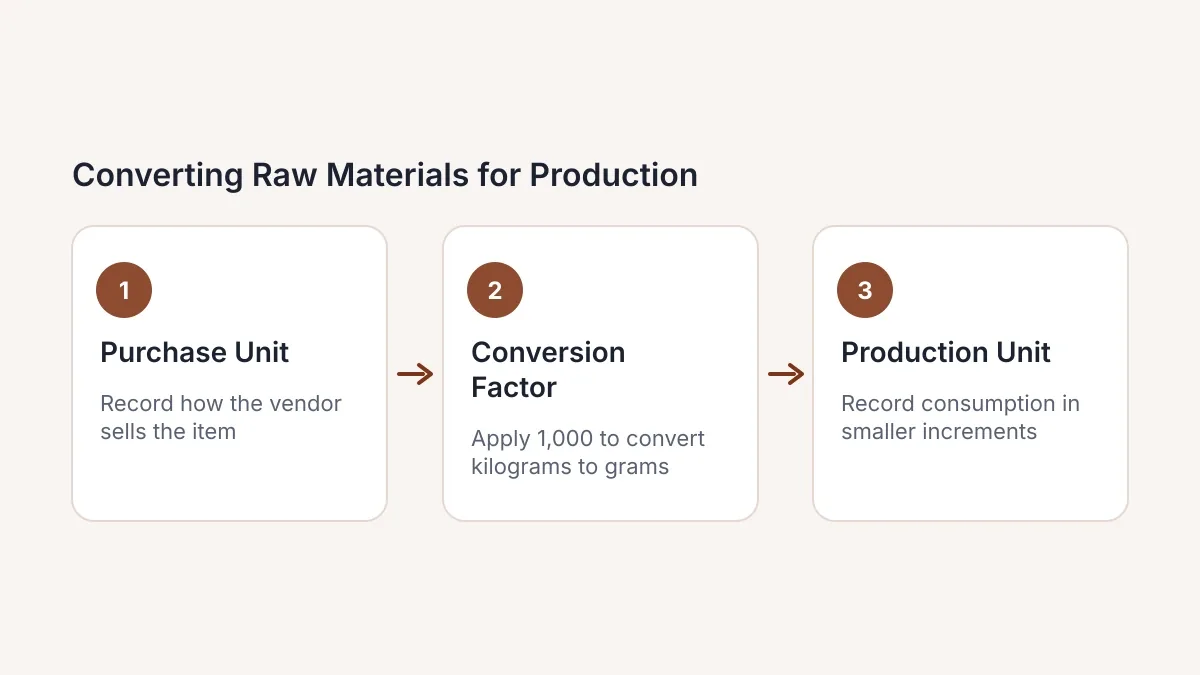
Choose one practical stock unit per material and use it everywhere in calculations. A 25 kg flour bag contains 25,000 g. Receiving two bags adds 50,000 g, not 2 or 50. If one bag costs 40 in your chosen currency, its cost per gram is 40 divided by 25,000, or 0.0016.
Received stock = purchase quantity × conversion factor
Cost per stock unit = purchase-unit cost ÷ conversion factor
The diagram's factor of 1,000 applies to one kilogram. A whole 25 kg bag uses 25,000 grams per bag. Always label what one purchase unit means.
Mass and volume are different. Do not convert grams to millilitres without the material's density, and distinguish US from imperial gallons. Drops vary with liquid and dropper, so our drops to mL guide gives estimates and calibration guidance, not a universal production conversion.
Worked example: how many loaves can you make?
Consider an illustrative recipe needing 500 g flour, 350 mL water and one bag per loaf. After other commitments, the bakery has 8,000 g flour, 7,000 mL water and 12 bags. This simplified example assumes no extra waste and no other recipe inputs.
Material capacity for one simplified bread recipe
Material
Available
Per loaf
Whole loaves
Flour
8,000 g
500 g
16
Water
7,000 mL
350 mL
20
Bags
12 units
1 unit
12
Bags limit the run to 12 packaged loaves. An order for 15 needs three additional bags; flour and water are covered. If flour has a 5% extra-usage allowance, its effective requirement becomes 525 g per loaf, supporting 15 whole loaves. Bags still set the overall limit at 12.
Your real BOM must include every required input, including starter, salt and labels where applicable. This is an inventory calculation, not a bread recipe. Check your own quantities in the free material shortage calculator.
Record receipts, production and sales once
The three tables are the workbook's core, not a complete audit trail. For day-to-day use, add a movement log with date, reference, item key, movement type and signed quantity. Supplier receipts increase raw stock. Production consumes raw materials and adds finished goods. Shipping finished goods reduces finished stock, not the raw ingredients a second time.
When an accepted order is produced, release its outstanding raw-material reservation as you deduct the consumed stock. If an order uses finished goods already on the shelf, reserve those goods instead of reserving raw inputs for the same units.
Reconcile physical counts with recorded balances regularly. Protect calculated columns and keep a recoverable workbook history. An Excel Table does not automatically import orders, log production or perform stock deductions.
Check inputs before trusting the formulas
Use data validation lists for identifiers and units, and restrict recipe quantities to positive numbers. Validation helps guide entry, but it is not a substitute for checking pasted data and reviewing errors.
Before confirming a batch, check for duplicate material keys, unknown BOM components, duplicate product-component pairs, mismatched units and missing recipes. Review negative stock, nonpositive quantities and lookup errors. Keep enough decimal precision in unit costs; rounding a tiny cost per gram too early can distort the batch total.
The formulas shown use English function names and commas. Some Excel language and regional settings use translated function names or semicolon separators. Adapt the syntax to your installation rather than changing the underlying calculation.
When the workbook becomes hard to maintain
Excel can model shared materials and collaborate on supported cloud-hosted workbooks. The question is whether your own process keeps receipts, reservations, recipe revisions and production records current. Software becomes useful when keeping those records synchronized is taking attention away from making.
Look for practical warning signs: recounting stock before every promise, stale copies of recipes, missing production deductions, or several orders competing for one ingredient. There is no universal number of products or hours that makes a spreadsheet unsuitable.
Makeable links recipes to live raw-material stock to show material capacity, unit costs and order feasibility. You can test your own materials and recipes on the free plan without a credit card. See why production spreadsheets become difficult to maintain before deciding whether to switch.
For information and estimates only. Makeable's formulas, batch limits and margin calculations are mathematical estimates based on your inputs. They are not certified accounting, financial, pricing or tax advice. You are solely responsible for setting your own wholesale and retail prices, ensuring profitability, and checking cost calculations before committing money.
Sources and formula notes
Microsoft documentation checked on 2026-10-31. Examples are illustrative; adapt the quantities and units to your own production records.
How do I create an inventory format in Excel for production?
Create Raw Materials, BOM and Finished Goods sheets, then turn each range into an Excel Table. Link them through unique material and product identifiers. Keep BOM quantities per finished unit, use consistent units, and calculate capacity from the lowest material-level result.
02
Can I use this format for a bakery, candle business or soap workshop?
Yes. Ingredients, wax, oils and packaging are raw materials; recipes provide their quantities per finished unit; completed loaves, candles or bars are finished goods. The workbook checks materials, but you must also account for production time, equipment and curing or cooling.
03
Should recipe quantities be per batch or per unit?
Either basis can work, but this guide's formulas use quantities per finished unit. Divide every batch requirement by batch yield before entering Quantity_Per_Unit. If you can only produce full batches, round the calculated output down to a multiple of the batch yield.
04
Does XLOOKUP work in every Excel version?
No. XLOOKUP is available in Microsoft 365 and Excel 2021 and later, but not Excel 2016 or 2019. Use INDEX with MATCH or another supported lookup in those versions. Check the availability of MINIFS too before copying the capacity formula.
05
Can I add capacities for products that share flour or wax?
No. Each product's capacity assumes it can use the available stock. Reserve the requirements for one planned product or accepted order, then recalculate the others. Adding independent capacities would count the shared stock more than once.
06
Does the BOM margin formula show my actual profit?
No. It shows margin after the material costs included in the BOM. Labour, overhead, fees and other omitted costs must be included before treating the result as an estimate of profit.